Studio Recording Equipment Essentials
Building a recording setup starts with matching the equipment to the sound you want to capture, the space available, and the way you work. A typical home or project studio combines microphones, an audio interface or recorder, headphones, studio monitors, cables, and a computer running a digital audio workstation (DAW). Producers may also add a MIDI keyboard, control surface, preamp, or outboard processor, while podcasters and voice artists often prioritize clear speech capture and simple monitoring. Acoustic treatment, such as panels and bass traps, can help manage reflections in a room, but it does not replace thoughtful microphone placement. Explore complete recording bundles or select components individually to suit your workflow. Ubuy offers a platform for discovering studio recording equipment from international product ranges.
- Core gear for recording, production, and monitoring
- Build a setup around your room and workflow
- Choose complete bundles or individual components
Microphones for Vocals, Instruments, and Podcasts
Microphone choice affects tone, detail, and how much room sound enters a recording. Large-diaphragm condenser microphones are popular for vocals and acoustic instruments in controlled spaces, while dynamic microphones are often selected for loud sources, live-style vocals, and untreated rooms. Small-diaphragm condensers can capture detailed transients from instruments such as guitar or percussion. Consider polar patterns: cardioid focuses on sound in front, figure-eight captures front and rear, and omnidirectional picks up sound from multiple directions. Check whether a condenser requires phantom power and whether the microphone connection matches your interface or preamp. A pop filter can reduce plosive bursts; a shock mount and sturdy stand help limit handling noise. Shure and Audio-Technica are recognized microphone brands to compare.
- Match microphone type to source and room
- Check polar pattern, connection, and power needs
- Consider stands, pop filters, and shock mounts
Audio Interfaces, Preamps, and Recording Inputs
An audio interface connects microphones, instruments, and other audio sources to a computer, converting analog signals into digital recordings and returning playback to headphones or monitors. Compare the number and type of inputs with your sessions: a solo vocalist may need only a few, while a drum kit or ensemble can require multiple microphone preamps. Combo XLR and quarter-inch inputs commonly accommodate microphones and line or instrument signals; dedicated instrument inputs are useful for direct guitar or bass recording. Also review connection type, supported sample rates, direct-monitoring controls, headphone outputs, and compatibility with your operating system and DAW. External preamps and portable digital recorders can expand or change a setup, but check signal levels and connection requirements. Ubuy can help shoppers discover interface and recording options across international product ranges.
- Match input count to the number of sources
- Review connections, monitoring, and DAW compatibility
- Check preamp and instrument-input requirements
Studio Monitors, Headphones, and Acoustic Treatment
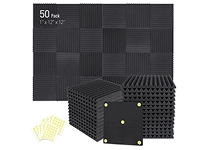
Accurate monitoring helps you make mix decisions that translate to other listening systems. Nearfield studio monitors are designed for close listening, making their size, placement, and room interaction important considerations. Compact monitors may suit a small desk, whereas larger drivers can provide more low-frequency output when the room supports them. Closed-back headphones limit sound leakage during microphone recording; open-back designs can offer a more spacious listening perspective for editing and mixing, though they leak audio. Compare comfort, impedance, frequency response, and connection type alongside your interface's headphone output. Position monitors symmetrically and at an appropriate listening distance, then address strong reflections and bass buildup with suitable acoustic treatment. KRK and Yamaha are familiar monitor brands, but room fit and listening needs matter more than brand alone.
- Choose monitors to suit room size and placement
- Use closed-back headphones for recording sessions
- Treat reflections and bass buildup thoughtfully
Recording Accessories, Software, and Studio Workflow
Small studio accessories can improve setup reliability and make sessions easier to manage. Balanced XLR and TRS cables are commonly used for audio connections; select suitable lengths and connectors, and keep signal and power cables organized. A microphone stand, desktop boom arm, pop filter, reflection screen, and headphone splitter may support specific recording tasks. DAW software handles recording, editing, arranging, and mixing, while plugins provide effects such as equalization, compression, reverb, and virtual instruments. MIDI controllers can make note entry and instrument control more intuitive, but they do not record audio on their own. Before buying software or hardware, confirm operating-system support, driver requirements, included licenses, and connection ports. Ubuy provides a place to explore recording accessories and production tools from international selections.
- Choose cables and stands for your recording setup
- Check software, drivers, and operating-system support
- Add MIDI and processing tools for specific needs
Select the Right studio recording equipment
Start by listing what you plan to record, how many sources you need at once, and whether the room is treated or shared. A voiceover setup, a guitar-and-vocal rig, and a multitrack band studio have different microphone, input, and monitoring needs. Check that microphones, interfaces, headphones, monitors, and computers use compatible connections and have the required power, drivers, and software support. Decide which features are essential now, such as phantom power, direct monitoring, low-latency performance, or expandable inputs, and which can wait. Consider desk space, portability, cable routing, and a realistic budget for accessories as well as primary equipment. Keep microphones dry and protected, coil cables without tight kinks, and follow manufacturer care guidance. Comparing specifications and intended use helps create a practical studio setup that can grow with your recording skills.
- Plan around sources, room, and session size
- Confirm compatibility, power, and software support
- Budget for accessories and future expansion