0 ratings






Item #:
36775453
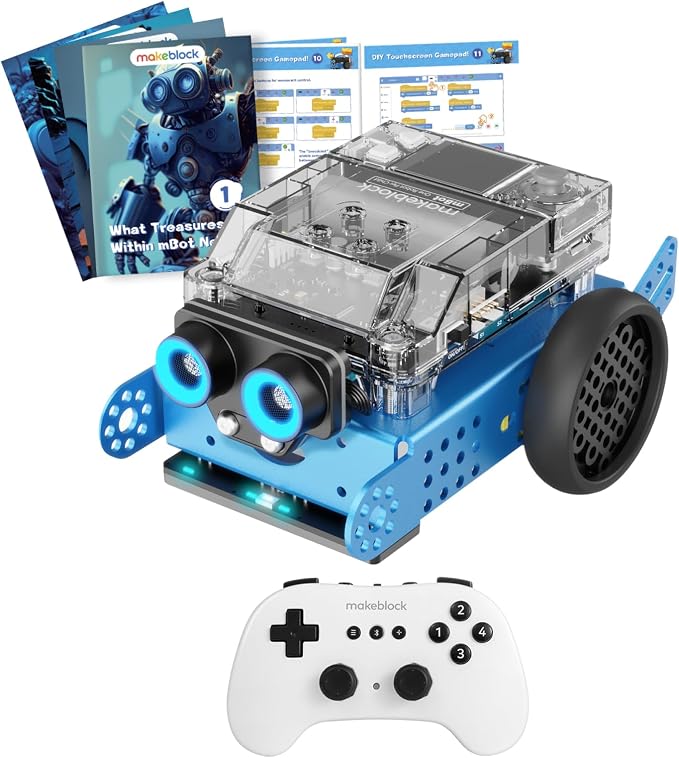
Makeblock mBot2 Educational Coding Robot with Bluetooth Wireless Remote Controller, Scrath and Python Programming in Classroom, AI and Technology
85% of respondents would recommend this to a friend
Item #:
36775453
DZD 40552
Price Details
Excluding Shipping & Custom charges ( Shipping and custom charges will be calculated on checkout )
*All items will import from US
0 ratings
Write a review
In stock
 Imported from USA store
Secured transaction
Ubuy works hard to protect your security and privacy. Our advanced payment security system ensures confidentiality by encrypting your information during transmission using AES (Advanced Encryption Standards) and SSL (Secure Socket Layer) protocols. Your payment details are 100% secure as we do not share your payment details with third party sellers.
Our Top Logistics Partners


mBot Neo is a powerful tool to get in touch with advanced technology such as AI, IoT and Data Science.
This bundle contains 2 items


Fast
Shipping

Free
Return*

Secure Packaging

100% Original Products

PCI DSS Compliance

ISO 27001 Certified



Note: Step Down Voltage Transformer required for using electronics products of US store (110-120). Recommended power converters Buy Now.


What Stands Out
Dual Programming Options
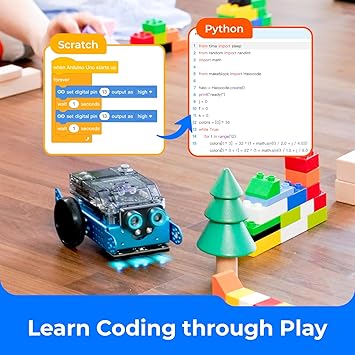
Supports Scratch and Python programming, allowing kids to seamlessly transition from visual coding to text-based coding, enhancing their coding skills and understanding of programming concepts.
Interactive Learning
Engages children with hands-on projects and real-time challenges, fostering creativity and critical thinking in technology and AI learning, making it fun and educational.
Bluetooth Connectivity
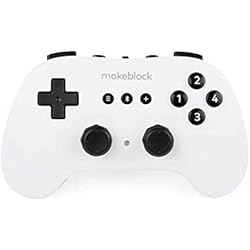
Equipped with a Bluetooth remote controller, enabling easy control and interaction with the robot from a distance, enhancing user experience and accessibility for classrooms or home learning.
Product Details
- One-on-one Bluetooth Remote Controller pair for one mBot Neo robot, ideal for classroom teaching.
- STEM educational robot kit for kids 8-12 to learn robotics, Scratch & Python Coding, and electronics.
- 4-core MCU with WIFI and Bluetooth modules enables Python programming, high-precision metal gear encoder motors, and various sensors for interactive projects.
- Interactive drag-and-drop software for programming learning, supporting Scratch or Python language with tutorials and project cases.
- Expandable with over 60 different modules, connect up to 10 sensors, motors, or other components, and add-on packs available for further learning.
| Brand Name | Makeblock |
| Age Range Description | Kid |
| Educational Objective | Coding Skills |
| Set Name | mBot2 |
| Number of Packs | 1 |
| Model Number | mBot Neo |
| Manufacturer recommended age | 0 - 12 years |
| Theme | Robot,Robots |
| Battery Description | Rechargeable |
| Material Type | Metal |
| Size | Medium |
| Item Weight | 3.5 lbs (1.59 kg) |
Who Should Buy?

-
Young Learners
Ideal for children ages 8-14, promoting early interest in coding and robotics through hands-on experience.
-
Educators
Perfect for teachers seeking innovative tools to incorporate programming and technology into their curriculum.
-
STEM Programs
Excellent for after-school STEM programs, fostering collaborative learning and problem-solving skills among students.

-
Advanced Coders
Not suitable for experienced programmers looking for complex coding challenges or advanced robotics functionality.
Product Description
Have any Query? Chat with us
Customer Questions & Answers
-
Question:
What programming languages can I use with the Makeblock mBot2?
Answer: The Makeblock mBot2 is compatible with Scratch and Python programming languages. Scratch is perfect for beginners as it uses a visual block-based approach, making it easy to learn coding concepts. Python, on the other hand, is ideal for advanced programming and allows for more complex and versatile project creations. This dual-language support enables users of all ages and skill levels to engage in coding activities that enhance problem-solving and logical thinking skills. -
Question:
What features does the Makeblock mBot2 include?
Answer: The mBot2 comes equipped with a variety of features such as Bluetooth connectivity, a wireless remote controller, and various sensors like ultrasonic and line-following sensors. These features allow users to navigate and interact with their environment effectively. The integration of AI and technology engages students in hands-on learning experiences, promoting creativity while allowing them to explore real-world applications of robotics and coding. -
Question:
Is the Makeblock mBot2 suitable for classrooms?
Answer: Absolutely! The Makeblock mBot2 is designed specifically for educational environments. It promotes collaborative learning, encourages teamwork, and enhances classroom engagement through interactive coding activities. With its user-friendly interface and compatibility with Scratch and Python, students from elementary to high school can effectively learn programming concepts while working on exciting projects. -
Question:
Can the mBot2 be controlled using a smartphone or tablet?
Answer: Yes, the Makeblock mBot2 can be controlled via Bluetooth using a smartphone or tablet. Users can download the Makeblock app, which is compatible with both iOS and Android devices. This allows students to engage with the robot wirelessly, promoting flexibility in learning and coding. Using a mobile device also makes it more accessible for students to test their coding skills on the go, enhancing their coding experience. -
Question:
What age group is the Makeblock mBot2 intended for?
Answer: The Makeblock mBot2 is suitable for a wide range of age groups, typically recommended for ages 8 and up. It offers various difficulty levels in programming, making it perfect for beginners and more experienced coders. The structured learning environment allows educators to adapt lessons based on student age and skill level, facilitating a comprehensive learning experience that grows with the students. -
Question:
What types of projects can be created with the mBot2?
Answer: With the Makeblock mBot2, users can create a variety of projects, including obstacle-avoiding robots, line-following robots, and even interactive games. The versatility of the mBot2 encourages creativity as students can explore different configurations and coding techniques. This hands-on approach fosters an understanding of robotics, coding, and engineering principles, making it ideal for project-based learning in the classroom. -
Question:
Is there any online support or community for mBot2 users?
Answer: Yes, Makeblock offers a wealth of online resources including tutorials, documentation, and project ideas on their official website. Additionally, there is a vibrant community of users who share their projects and coding solutions on forums and social media platforms. This support network ensures that both educators and students can find help and inspiration as they work with the mBot2, making the learning process more enjoyable. -
Question:
Does the mBot2 come assembled or does it require building?
Answer: The Makeblock mBot2 comes in a semi-assembled form, requiring some assembly to complete. This feature enhances the educational value, as students can participate in building the robot, learning about its components and how they function together. This assembly process serves as a practical introduction to robotics, making it an interactive experience that promotes teamwork and critical-thinking skills. -
Question:
What sensors are included with the Makeblock mBot2?
Answer: The Makeblock mBot2 includes several sensors, notably an ultrasonic sensor for distance measurement, a line-following sensor, and ambient light sensors. These sensors enable the mBot2 to interact with its environment, providing students practical experience in robotics. By utilizing these sensors, students can experiment with different coding challenges, enhancing their understanding of how robots can navigate and respond to their surroundings. -
Question:
Where can I buy the Makeblock mBot2 Educational Coding Robot?
Answer: You can buy the Makeblock mBot2 Educational Coding Robot with Bluetooth Wireless Remote Controller at Ubuy in Algeria. Ubuy provides a reliable online shopping experience with a wide range of educational products, ensuring you have access to the best tools for enhancing your teaching or learning experience.
Makeblock Science Kits & Toys mBot Neo Editorial Review
The Makeblock mBot2 Educational Coding Robot with Bluetooth Wireless Remote Controller engages kids in AI and technology learning while enhancing their coding skills through Scratch and Python programming. Designed for kids aged up to 12 years, this medium-sized robot is made of durable metal and features a rechargeable battery for endless play. Parents appreciate how this robot fosters creativity and problem-solving abilities in a fun, interactive way, making it a great educational tool for classrooms. Its user-friendly nature allows children to dive deep into coding and robotics effortlessly, sparking curiosity and innovation.
Customer Reviews & Ratings
2 customers ratings
-
5 Star
100%
-
4 Star
0%
-
3 Star
0%
-
2 Star
0%
-
1 Star
0%
Review this product
Share your thoughts with other customers
Pros
- Enhances coding skills in a fun way
- Supports Scratch and Python programming
- Durable metal construction for longevity
- Rechargeable battery for continuous use
- Ideal for classroom and at-home learning
Cons
- May require adult supervision during initial setup
Platform Trust & Buyer Confidence

JK
Jasmin
Verified buyer
“Great products and very good service: very easy and very fast international delivery.”
9 September 2026 · via Trustpilot
AG
Anke
Verified buyer
“Wonderful online shopping experience, smooth transaction from the start. Payment method works conveniently and delivery is unexpectedly fast and reliable. You go the extra mile for service. What makes this even more amazing, you deliver to Namibia. I will remain a happy Ubuy customer and will increase my purchases for sure! Thank you!”
10 September 2026 · via Trustpilot
H
Hazel
Verified buyer
“Very easy to find the products what you need, and so fast delivery, that’s why I highly recommended to others costumers to used ubuy.”
10 September 2026 · via Trustpilot
O
Opaleye
Verified buyer
“I received exactly what I ordered I was skeptical about your site because that was my first time to order. But the order came timely and neatly packaged. I was not disappointed. Thank you.”
11 September 2026 · via Trustpilot
AC
Adele
Verified buyer
“Easy to find and order what you want on the website. Delivery is quick to the UK”
8 September 2026 · via Trustpilot
Secure Checkout
Global Delivery
Easy Returns
Genuine Products
Product Price History
Important information
- Limitations : For products shipped internationally, please note that any manufacturer warranty may not be valid; manufacturer service options may not be available; product manuals, instructions, and safety warnings may not be in destination country languages; the products (and accompanying materials) may not be designed in accordance with destination country standards, specifications, and labeling requirements; and the products may not conform to destination country voltage and other electrical standards (requiring use of an adapter or converter if appropriate). The recipient is responsible for assuring that the product can be lawfully imported to the destination country. When ordering from Ubuy or its affiliates, the recipient is the importer of record and must comply with all laws and regulations of the destination country.
- Not all the products listed on Ubuy are for sale, as Ubuy is a global search engine. Products are subject to export/trade regulations.
DZD 40552
Order now and get it around Friday, October 09
This item is not restrict in my country.(Please click on above link if this item is not restrict in your country, So our team will review and allow.)
QTY:
Secured transaction
PCI DSS compliant and ISO 27001:2022 certified, with encrypted payments and full buyer protection on every order.
Our Top Logistics Partners
Fastest cross-border delivery
Features & Benefits
- Bluetooth Remote Controller pair for one mBot Neo robot
- STEM educational robot kit for young beginners
- 4-core MCU integrates WIFI and Bluetooth modules inside
- Learn programming step-by-step through interactive drag-and-drop software and Python language
- Expandable with more than 60 different modules and add-on packs
- A powerful tool to get in touch with advanced technology
Ubuy Assurance
Experience worry-free shopping with 100% original products, PCI DSS-compliant payment security, ISO 27001-certified data protection, the fastest cross-border delivery, free returns *, and secure packaging on every order.