- Home Page /
- Sports Outdoor & Fitness /
- Sports /
- Water Sports /
- Diving & Snorkeling /
- Gauges /
- Digital Gauges /
- SCUBAPRO Galileo HUD Hands-Free Diving Comput...
0 ratings

Item #:
13840851
SCUBAPRO Galileo HUD Hands-Free Diving Computer with Transmitter
Item #:
13840851
DZD 187567
Price Details
Excluding Shipping & Custom charges ( Shipping and custom charges will be calculated on checkout )
*All items will import from US
0 ratings
Write a review
In stock
 Imported from USA store
QTY:
Order now and get it around Thursday, July 09
Secured transaction
Ubuy works hard to protect your security and privacy. Our advanced payment security system ensures confidentiality by encrypting your information during transmission using AES (Advanced Encryption Standards) and SSL (Secure Socket Layer) protocols. Your payment details are 100% secure as we do not share your payment details with third party sellers.
Our Top Logistics Partners


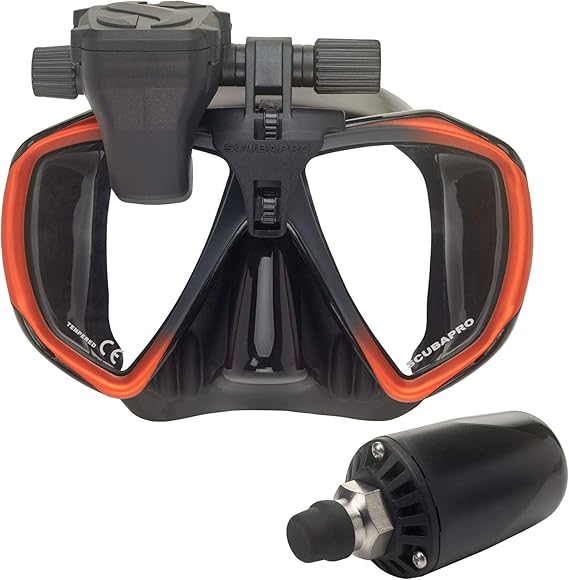
The Galileo HUD dive computer is an innovative mask-mounted, hands-free dive computer designed to keep you fully immersed in your dive, so you can experience more freedom on your dive.

Fast
Shipping

Free
Return*

Secure Packaging

100% Original Products

PCI DSS Compliance

ISO 27001 Certified


Note: Step Down Voltage Transformer required for using electronics products of US store (110-120). Recommended power converters Buy Now.


What Stands Out
Hands-Free Display
The HUD design offers a continuous, unobtrusive stream of vital diving data, allowing divers to focus on their surroundings while easily monitoring essential metrics without diverting attention.
Wireless Transmitter
Includes a wireless tank pressure transmitter that provides real-time monitoring, ensuring divers have accurate and timely information about their air supply during dives, enhancing safety and confidence.
Advanced Navigation
Features integrated navigation capabilities, enriching dive experiences with built-in compass and dive planning tools, enabling divers to explore with confidence and precision in diverse underwater environments.
Product Details
| Item Weight | 2 lbs (910 grams) |
Who Should Buy?

-
Advanced Divers
Experienced divers who need comprehensive dive data and metrics for deep dives and technical diving situations.
-
Tech Enthusiasts
Divers who appreciate cutting-edge technology and want to utilize smart features like wireless air integration.
-
Safety-Conscious Divers
Divers prioritizing safety who benefit from real-time data displayed hands-free while maintaining focus on their surroundings.

-
Beginner Divers
New divers may find the device's advanced features overwhelming and unnecessary for their basic diving needs.
-
Budget-Conscious Users
Divers looking for economical options might find this product's price tag beyond their financial reach.
-
Minimalist Divers
Divers preferring simplicity and less technical equipment may not appreciate the complexity of the Galileo HUD.
Product Description
SCUBAPRO Galileo HUD Hands-Free Diving Computer with Transmitter
Have any Query? Chat with us
Customer Questions & Answers
-
Question:
What features does the SCUBAPRO Galileo HUD Diving Computer offer?
Answer: The SCUBAPRO Galileo HUD Diving Computer boasts a heads-up display (HUD) design, allowing divers to monitor critical information without losing sight of their surroundings. It features multi-gas support, customizable dive modes, and an intuitive interface. This computer is also equipped with a transmitter for real-time tank pressure monitoring, enhancing safety during dives. The significant use case for these features is in deep diving where divers need quick access to vital stats to ensure safe and efficient exploration. -
Question:
Is the SCUBAPRO Galileo HUD Diving Computer suitable for beginners?
Answer: Yes, the SCUBAPRO Galileo HUD is suitable for divers of all experience levels, including beginners. Its user-friendly interface allows for easy navigation through features and settings, making it approachable for those new to diving. Furthermore, the heads-up display helps novices maintain situational awareness while focusing on their underwater surroundings, thus enhancing their overall diving experience and confidence. -
Question:
How does the SCUBAPRO Galileo HUD Diving Computer enhance safety while diving?
Answer: The SCUBAPRO Galileo HUD enhances safety through its real-time monitoring capabilities and customizable alerts. By providing critical information such as depth, dive time, and tank pressure directly in the diver's line of sight, it minimizes distractions and allows for quicker decision-making. This feature is especially valuable during ascent and decompression phases, where monitoring time and depth is crucial for safe diving practices. -
Question:
What is the battery life of the SCUBAPRO Galileo HUD Diving Computer?
Answer: The SCUBAPRO Galileo HUD Diving Computer typically features an extended battery life that allows for numerous dives between charges. This long-lasting performance is vital for avid divers who want reliability while exploring the ocean depths. Frequent usage scenarios include multi-day diving trips where recharging opportunities might be limited. Therefore, it’s important to always have fully charged equipment before heading out. -
Question:
Can the SCUBAPRO Galileo HUD Diving Computer be used for technical diving?
Answer: Absolutely! The SCUBAPRO Galileo HUD is not only ideal for recreational diving, but it is also designed to accommodate technical divers. It supports multiple gas mixes, allowing divers to switch gases during dives, a common requirement in technical diving. Therefore, whether you're diving with air, nitrox, or trimix, this computer efficiently manages your dive profiles to keep you informed and safe throughout your adventure. -
Question:
How do I update the software on the SCUBAPRO Galileo HUD Diving Computer?
Answer: Updating the software on the SCUBAPRO Galileo HUD can be done through the SCUBAPRO website or via their dedicated update software. You'll need to connect the device to a computer using the provided USB cable and follow the instructions on the screen. Regular updates help enhance functionality, improve performance, and ensure you have the latest safety features. This is particularly important as diving technology evolves and new guidelines are established. -
Question:
Is the SCUBAPRO Galileo HUD Diving Computer compatible with other SCUBAPRO equipment?
Answer: Yes, the SCUBAPRO Galileo HUD is designed to seamlessly integrate with other SCUBAPRO equipment. Its transmitter syncs easily with SCUBAPRO tanks and regulators for smooth operation. This compatibility enhances the overall diving experience, as divers can utilize various SCUBAPRO tools and accessories, ensuring a cohesive and efficient setup. Whether you're using a SCUBAPRO dive mask or wetsuit, everything works together harmoniously. -
Question:
What kind of display does the SCUBAPRO Galileo HUD Diving Computer use?
Answer: The SCUBAPRO Galileo HUD Diving Computer features a high-contrast, easy-to-read display that shows crucial information at a glance. The HUD technology projects dive data onto a heads-up screen, allowing divers to monitor their stats without looking down. This is particularly advantageous during challenging dive conditions, such as low visibility or while performing complex maneuvers, where keeping an eye on critical data can improve safety and situational awareness. -
Question:
What measurements can I track with the SCUBAPRO Galileo HUD Diving Computer?
Answer: The SCUBAPRO Galileo HUD allows divers to track important measurements, including current depth, dive time, remaining bottom time, and decompression status. Additionally, it displays tank pressure readings when paired with the transmitter. This comprehensive real-time data tracking is essential for divers, especially when executing deep dives or complex dive plans where maintaining the parameters is critical for safety and success. -
Question:
What is the recommended maintenance for the SCUBAPRO Galileo HUD Diving Computer?
Answer: To ensure your SCUBAPRO Galileo HUD remains in optimal condition, regular maintenance is advised. Rinse it with fresh water after dives to remove salt and debris, and check the seals for any signs of wear. Additionally, it's important to periodically check battery functionality and software updates. By following a maintenance routine, divers can extend the lifespan of the device and ensure peak performance during their diving activities. -
Question:
Where can I buy SCUBAPRO Galileo HUD Hands-Free Diving Computer with Transmitter in Algeria?
Answer: You can purchase the SCUBAPRO Galileo HUD Hands-Free Diving Computer with Transmitter from Ubuy. They offer a wide selection of products, excellent customer service, and reliable delivery options, making it a convenient choice for acquiring your diving equipment.
SCUBAPRO Digital Gauges Editorial Review
The Scubapro HUD dive computer is an attractive and innovative dive computer with many features. You can download dive data wirelessly to your phone or handheld device using USB cable or Bluetooth. The HUD eliminates the need for corrective lenses, and it delivers excellent readability along with hands-free monitoring with its floating design, making it ideal for night diving. It has an air-integrated interface with a Scubapro air transmitter that sends signals to both computers for air supply. It is, however, only mounted on a two-window Scubapro mask. There seem to be some problems with customer expectations being met. The device seems to malfunction, with a few buyers experiencing difficulty in turning on the device, which Scubapro says is due to factory packaging in deep sleep mode to save battery life. Some buyers find the instructions limited or vague; however, a full manual is available online. There are charging issues too, with some customers unable to charge their device due to quality issues with the USB cable, and the battery dying too often, leading to issues with the device going to deep sleep mode.
Customer Reviews & Ratings
1 customers ratings
-
5 Star
100%
-
4 Star
0%
-
3 Star
0%
-
2 Star
0%
-
1 Star
0%
Review this product
Share your thoughts with other customers
Pros
- Innovative design
- Air-integrated interface
- Wirelessly downloads
- Eliminates corrective lens
- Excellent readability
Cons
- Malfunctions
Product Price History
Important information
- Limitations : For products shipped internationally, please note that any manufacturer warranty may not be valid; manufacturer service options may not be available; product manuals, instructions, and safety warnings may not be in destination country languages; the products (and accompanying materials) may not be designed in accordance with destination country standards, specifications, and labeling requirements; and the products may not conform to destination country voltage and other electrical standards (requiring use of an adapter or converter if appropriate). The recipient is responsible for assuring that the product can be lawfully imported to the destination country. When ordering from Ubuy or its affiliates, the recipient is the importer of record and must comply with all laws and regulations of the destination country.
- Not all the products listed on Ubuy are for sale, as Ubuy is a global search engine. Products are subject to export/trade regulations.
DZD 187567
Order now and get it around Thursday, July 09
This item is not restrict in my country.(Please click on above link if this item is not restrict in your country, So our team will review and allow.)
QTY:
Secured transaction
Ubuy works hard to protect your security and privacy. Our advanced payment security system ensures confidentiality by encrypting your information during transmission using AES (Advanced Encryption Standards) and SSL (Secure Socket Layer) protocols. Your payment details are 100% secure as we do not share your payment details with third party sellers.
Our Top Logistics Partners
Fastest cross-border delivery
Features & Benefits
- Mask-mounted dive computer offers a superior user experience
- Precision near-eye Optics for easy monitoring of dive data
- Full color OLED display for maximum readability
- Intuitive single-knob user control for easy navigation
- Flip up hinge mechanism for convenient access to dive data
- Suitable for boating and outdoor lifestyle